Apple surpasses other mobile brands by producing devices that are highly efficient to use, especially the iPhone. Though, iOS6 didn’t turned out to be a productive choice for many mobile users, iPhone 5S is one of the best looking smartphones that Apple has introduced, which comes along with a plethora of stylish accessories to further enhance the look of the device and is packed with astounding features. But with plenty of features and the perks of iPhone Mobile Application Development services it’s easy to overlook at some of them.
I’ve put together a list of 5 basic and useful tips to check out how to utilize your iPhone 5S device.
1. Get Quick and Secure Access with Touch ID
We all do check our phones dozens of times in a day. But, every time opening the passcode could slow you down. But it is important so as to avoid some other person from accessing your device. Thankfully, iPhone 5S has introduced a new feature –Touch ID (a fingerprint identity sensor) that lets you check your iPhone without wasting much of your time.
What’ll you need to do is to place your finger on the Home screen button to unlock your iPhone. Besides this, Touch ID also helps render secure shopping swiftly, as with a mere touch of your fingerprint you can approve buying from the Apple’s app store, iTunes Store, and the iBooks Store, thus you no longer need to enter your password.
2. Capture Incredible Photos with iSight Camera

The most important thing to consider when purchasing any mobile device is the quality of the camera, so that anyone can capture some great shots anywhere. iPhone 5S features avant-garde technologies tailored for the iSight camera app. In order to launch the camera app, swipe your home screen and just tap the small camera icon given at the bottom right of the lock screen.
What’s more, the iSight camera app helps to capture beautiful images around 8 megapixels in size. All you’ve to do is to aim and then shoot. The camera app introduced by a highly skilled iOS App Developer will select only the best shot and binds the rest captured photos in a sub folder. Now, this is definitely a great and easier way to delete the bad shots.
3. Save your Phone Battery Life
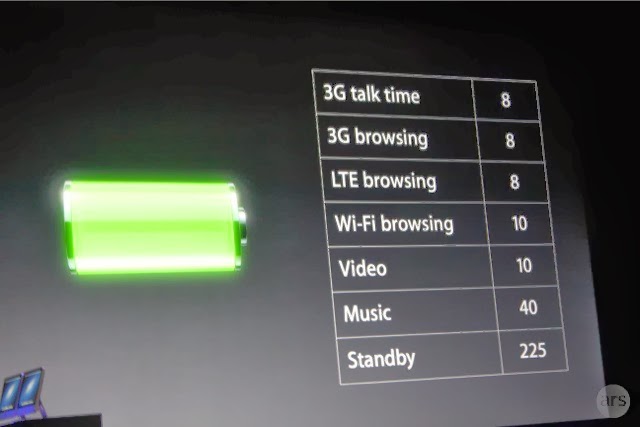
The most common yet highly essential aspect is turning off your iPhone 5S settings when the phone’s battery is running low. This way you can make your phone run a bit longer. Just go to the settings click on the option that you want to turn off and click on the off option. For example, in order to turn off your Wi-Fi, go to Settings > Wi-Fi > Off.
You can also turn off a lot of other options as well by visiting the settings option, like Bluetooth, Privacy, Sounds etc.
4. How to Make Siri More Useful
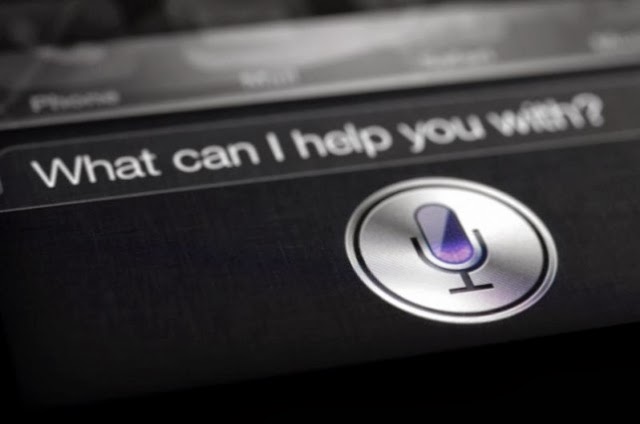
Want to make your daily tasks less burdensome? Then, you need to learn how to use Siri Although, Siri might not be a new addition to the iPhone 5S powered device, but it has been enhanced and is worth using. In order to launch the Siri app tapping and holding down the home screen button is not required, instead what you need to do is to go into:
Settings > General > Siri and turn Raise to Speak on.
Remember to talk to Siri – to work on things just the way as you talk to someone, it is because Siri understands whatever you say and meant. It even talks back. For example, you can tell Siri to turn on or turn off the Wi-Fi settings and much more.
5. Adding Additional Emoticons to your Text Messages

Sending plain text messages seems to be boring at times. If you want to add zing to you text messages, iPhone 5S bestows you with the option to unlock a wide variety of emoticons and images to be added to your messages. You can do this be picking up an Emoji. How? Just follow the below mentioned ways:
Go to Settings > General > Keyboard > Keyboards > Add New Keyboard > Emoji.
So, the next time when you’re typing up a message, you can see a globe icon at the bottom left of your message window – just flick it up to access a wide range of emoticons to use.
If you’ve purchased iPhone 5S and missed out a few basic features, such as how to add security, make use of the camera, and a few other basic things, it is recommended that you must take a good look at the aforementioned tips that will provide you with a good idea – as how to efficiently use your iPhone 5S as per your requirements.
About the Author:
Rick Brown is a highly skilled and experienced content writer and working for a iPhone Application Development Company. You can hire an iPhone App Developer by getting in touch with him.
Posted by Ravi Kolhe |
2/25/2014 | Continue Reading...
People always have expectations. No matter how advanced a device is there is always something that is missing. That is one thing that Samsung can readily attest to. It’s no secret that Samsung has done very well when it comes to their Galaxy S series of smart phones. It is also no secret that they have received a lot of criticism over the casing of the devices. Samsung is well known for their plastic casing on their flagship line of smart phones. This is one thing that people are always complaining about.
The plastic casing makes handling a device a bit tricky. Of course the sleek look is appreciated but the slippery nature of it, not so much. Some people have to struggle to get a grip on their Samsung smart phones. This can be frustrating at times. The casing also makes the devices venerable to accidents like drops. This is one of the reasons why people want a metal casing.
This has been one desire that Samsung has not found away to fulfill. People were expecting they would do something different with the Galaxy S4 but that did not happen. Then people kept hoping that the Galaxy Note 4 would also be different. That was a disappointment too. What Samsung did with the Note 4 was just give it a faux leather design. People have however not given up. There are rumors that Samsung are seriously considering the metal casing on their devices.
Samsung is apparently looking for options on aluminum or metal casings. This may not be ready however for the S5 and that would mean the S6 would get it. This is not something that Samsung has spoken about but the insinuations are still there. There have been reports of Samsung sending engineers to research on the technology. If this were true, then it would be good news for a lot of Samsung fans. Even if it may take a while to perfect the whole thing, it would definitely be worth it.
A metal or aluminum casing for the Samsung Galaxy S6 would boost the device to greater height. Besides offering more convenience, it would provide better protection for the device. There have been unconfirmed reports that the metal casing may go into a new line of Samsung smart phones. That however can not be taken very seriously. Even if they did launch a new line, they would still need to make improvements on the casing of the Galaxy S series. It is highly probable that the Samsung Galaxy S6 will come with a metal casing when it does get released.
Posted by Ravi Kolhe |
2/22/2014 | Continue Reading...
Galaxy Note 4 Phablet is likely to be the next big device in the world of handheld devices. While all people are busy talking about the release of the Galaxy S5, rumors has it that this techno logy giant is planning to release a new phablet. The new device is an innovative technology creation that will be a successor to its Galaxy Note 3. Rumors have it that the new Note 4 will be released during the second half of this year.
According to the executive vice present of Samsung Lee Young Hee, the device is being designed to meet the needs of high-end segment of the market. This implies that this device is likely to have new-age technology that will impress the market. The device is being developed by professionals for professionals.
Samsung Galaxy Note 4 release date
Rumors are that this device will be released during the third quarter of this year. This is likely to be between August and September. Some sources working with Samsung reveal that the device will come with more innovative features than its preceding models.
Galaxy Note 3 had a fabulous response from consumers. Samsung based its innovation on Galaxy Note 3 while manufacturing this device. Most of the improvements made on Samsung Note 3 were based on the reviews of reviewers and users. In addition, it comes with more innovative and unbeaten specs.
Specs of Galaxy Note 4
Samsung considered the fact that, when purchasing any Smartphone, consumers consider its specs.
Among the specs of this device include the following:
• Camera: This device will come with 13 Mega pixel cameras. These cameras will come with a new feature called anti-snake. This makes it possible to take still shots perfectly using this device. In addition, you can take quality shots under low light using this device. The camera will also be extra sensitive.
• Operating system: This device will have an Android 4.4 KitKat. Galaxy Note 3 came with a 4.3 Jellybean. This implies that 4.4 will be an upgrade of this device and it would mean that the device will introduce new notifications icons and more personalized themes.
• Wireless charging: Rumors have it that Samsung is developing a more innovative technology that will include wireless charging. There are Smartphone models that are already using wireless charging technology. However, these use charging pad to charge phones. With the new device, magnetic resonance technology will apply. This implies that Galaxy Note 4 will charge longer to enhance convenience.
Other specs of this device include a 5.9 inch full high definition screen. The device will also have an octa-core processor with internal memory of 4 GB. People are always looking for gadgets with larger memory. This Galaxy Note is expected to come with an expendable memory of up to 64G. This implies that the device will be the first to allow users to enjoy 64-bit memory. The battery of this device will have 3,300mAh. Nevertheless, technology fans can always expect the best from Galaxy Note 4.
|
2/22/2014 | Continue Reading...
Many fans are expecting the launching of the Samsung Galaxy Note 4 eagerly. By now, the social media is full of stories of how the gadget looks like. Some other sites even have images that are expected to liken it. While the fans scroll through reading the various specifications and the tentative date of launch, you could maybe ask yourself; what is running at the background? How did the Samsung actually come about the features that are expected to appear in the current Note 4?
Well, in such a market, it is almost impossible to completely ignore the competitors. This is because for everything that you produce, you must have the competitors at the back of your mind. Every company wants to produce a gadget that is stronger than its competitors. They also want to build on the limitations of the others. This way, they try the market and bring about new, high-quality products.
Even the finest details are put into deep consideration here. For instance, Samsung was very much concerned when they were unveiling the Samsung Note 3. This is because they were afraid that the iphone 5C that was launched could have left the customers thinking that the plastic backing symbolized that it was cheap.
This would also have meant that the quality was compromised, hence shifting people’s attention away from the gadget. Therefore, the idea of having a plastic backed gadget versus the metal backed gadget means everything to a manufacturing company. To this effect, it is also rumored that the Korean Company is trying to test the workability of other materials apart from glass/ metal and plastics. Actually, the ET News reported that Samsung has already sent some of its best engineers to Vietnam to further these tests on materials such as aluminum and also magnesium, to be used as backs.
The other thing about this gadget is its expected display. In the past, Samsung has been known to adjust the screen of every new phone they introduce to the market by 0.2 inches. However, so many fans have their hopes high and crossed fingers that this time, the tradition could be broken and see the Company skip to a 5.9 inch screen. Well, at the moment, the Samsung note 3 has a 5.7 inch screen and it is not known whether this will be maintained for its successor or the fans’ demands will finally be met.
|
2/06/2014 | Continue Reading...
When it comes to running a website speed is absolutely everything. If your website does not load fast enough then you will find that your website visitors will leave in droves. In addition to this you will find that it is VERY difficult to get ranked highly in the search engines. Have no fear though. If you work with a decent Phoenix Web Development company then it is simple to boost the speed of your website. On this page I want to share with you five tips that you can use to boost the speed of your page. If you do not know how to implement any of these into your site then by all means ask a Phoenix Web Design Company. They should be able to help you out!
1. One of the main reasons as to why websites load slowly is because there is far too much media on a page. There are plenty of website owners who think that in order to have a decent website they need to pack it to the brim with videos, sound clips (awful idea by the way) and photos. You really don’t. In fact, in the world of web design, especially in this day and age ‘less is more’! It is therefore suggested that you cut back to only what is necessary. Do not include anything that is not contributing to the overall feel of the website.
2. There are plenty of websites out there which have poor coding behind the site. What you need to remember is that before a web site is displayed every piece of code needs to be loaded by the web browser or web server. Every line of code that is loaded will add a significant amount of time onto the load speed of the website. I suggest that if your site is loading slowly then you get in touch with an experienced web developer in Phoenix. They will be able to go through your code line by line and cut it back.
3. There are many websites out there which load slowly but for an indeterminate reason. Most of the time this is down to the web server that they are located on. If your site is loading slowly and you are on a very cheap hosting plan then it may be worth talking to a web designer to help you get moved to a new host. A lot of the time this can add a lot of speed to your site without adding too much in terms of running costs.
4. There are some file formats that are not suitable for the web. For example, if the images on your website are in .bmp format then they can easily run to a good couple of megabytes in size. This could take up to a minute to download. If you convert them to .jpg format or even .gif then you could cut them back to a few KB in size without losing too much quality (it will be unnoticeable on screens). This will take seconds to load instead. If you do not know how to change the file type of images then I suggest that you talk to a professional.
5. Look into trying to get your website cached in the browser of your website user. This will ensure that your website loads quickly in each subsequent visit. This may be something that is very difficult to incorporate into your website if you are not familiar with coding. However, this is one of the best ways to boost load speed.
|
1/30/2014 | Continue Reading...
Want to take a screen with your android tablet or mobile phone?If the answer is positive, the first thing you need to do is to check whether your android device supporting screenshots becausetaking a screenshot on Android deviceis not as straightforward as it seems. The operation system Android 4.0 or later offers us a built-in way to take a good screenshot, however, if your device using an older version of the Android, it’s little consolation to capture a screenshots.
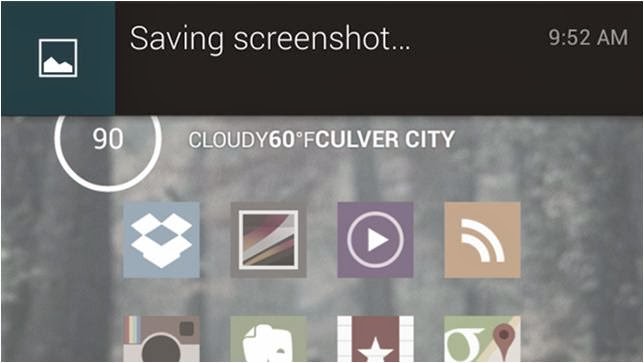
On the whole, there are two types of all the android devices; one is the device support a built-in way to take a good screenshot, the other is not. Aimed at the two types of mobile phones,below editor will show android user an easy-to-use guide helping android user to take the screenshot on an Android Device respectively!
For the Devices that support screenshots: Android 4.0 or above
Well, most of the android devices that equipped with the operation system Android 4.0 or latercan take the screenshots directly. So if you want to capture a picture of the phone’s screen, just hit the Volume Down button and keep it down for a while, at the same time press the Power button, then you will get a prompt message allowing you to take a screenshot. Why we can capture a screenshot in this way? It is because most of the Mobile phone makers had upgrade the phone operationsystem and screenshots are built right into your phone!
For the Device that don’t support screenshots: Android 2.3 or below
Well, for the devices that do not support screenshots, it is a little trouble to get a screenshots. Generally we go and get an app for help. There exists many free app on the Internet can help you to take a screenshot; unfortunately they all can’t work on anunrooted android device.
If you don't want to root your android device because of the complexhigh-risk operation,$3 will save you much energy. An app named No Root Screenshot It (£2.99) is a well-received program easily enables you to capture a screenshot, with it what you should do is download and install it on your android device.
Note: the app needs connect the android device to you PC via an USB cable because when you installed it on your device and connect it to you PC, it will instruct you to get a free desktop application to help you finishing the screenshots job. Once the two matched apps were installed successfully inturn, the app will enable screenshots on the device.
Author the Author:
Jerry Brown is a good writer of drm-assistant.com. He writes for it for two years and step into the software industry for three years. The app DVD ripping program his site shares with the DVD movie lovers had earns much praise. Plus it can take DVD region code off as well!
|
1/23/2014 | Continue Reading...
Customer service on social media is a tricky business. You must think carefully about how you respond to messages, regardless of their content. Each organization will have its own idea of how to answer the questions of current and prospective customers.
Many people will simply have a question about your products or services. Others will mention your organization in passing during conversations with friends or family members. If you notice a message that contains an inquiry, you can offer to reach out and help. People will love this proactive approach – and it will provide a boost to your online reputation. Some organizations reply to all messages, while others don’t. What happens regularly is that organizations don’t react to Facebook status updates or Tweets that mention their names but not their Twitter handle.
How to Recognize Customer Feedback
If users choose to compliment your organization, it’s recommended that you thank them publicly or click “Favorite” on their message. If users instead choose to mock or insult your organization, don’t incite an argument by posting a reply. Ignore these messages and, if necessary, address them offline. People are free to divulge their opinion or critique your products or services, but don’t let the situation escalate further.
Businesses can understand and influence the conversation as never before, while listening to what their consumers are saying. Social media has affected the role of the public relations professional remarkably. The job has become more demanding as these front-line practitioners must think quickly on their feet.
How to Monitor Social-Media Conversations
Given the arrival of Facebook, Twitter and other up-to-the-minute social-media sites, businesses must respond quickly when a crisis occurs. It’s an intelligent tactic to monitor conversations focused on your industry competitors. In this action, you’ll learn what their strengths and weakness are – which gives you the opportunity to capitalize on their shortcomings. You can use all your newfound information to improve the experience of your own customers. Small business owners have the ability to communicate in an instant and establish a rapport with customers.
Keep tabs on the online mentions of your business and its products and services.
Social-media channels are available at all times. Most small businesses focus on peak usage times – but customers are accessing these networks at their convenience. It may be hard to devote time to this habit, but many small business owners are managing just fine. According to a recent MarketMeSuite infographic, 26 percent of small businesses devote an hour or more to these social-media channels each day. Although some of these small businesses are Web-only entities, these numbers indicate the importance of taking stock of your online reputation.
How to Turn Readers into Customers
One last note: You should not try to fabricate your positive reviews. The best strategy is to create articles, blogs, infographics, videos and other forms of content that will accentuate the best aspects of your business and assist your audience in some way. Google is getting smarter about understanding web content, and will display videos and images right alongside text content. Social-media fans and followers like to think of themselves as creative, so giving them the opportunity to share their artistic flair could result in a considerable amount of traffic. The more traffic that visits your site, the more sales that you’re likely to experience. You should also strive to interact with potential business partners and industry leaders who could prove to be major benefits for your business.
Small business owners are leaving sales on the table when they fail to their online presence. Don’t get left behind.
About the Author:
Blake Jonathan Boldt is a content strategist for Reputation Advocate. He provides writing, editing, social media and content strategy services for both domestic and international clients. His articles have been featured in numerous magazines, newspapers and digital media outlets.
|
1/22/2014 | Continue Reading...
Yes, you heard it right! You can also create your own custom web-browser for your computer and browse within it. There may be a question rise in your mind that how we can make a browser without knowing any coding, but don’t worry because there is a free online tool which let you make your own browser with some customized features without any coding to do. If you want to make yours and want to know how then you’ve to read this post because here we’re going to teach you briefly how to make your own browser for PC.
Customizations you can apply:
In the browser you are going to make, you can apply the following customizations, i.e
1. Your own logo
2. Custom Name
3. Custom bookmarks and homepage
4. Custom features – given below etc.
How to Make Your Own Browser Online:
Now here we’re going to teach you how you can make your own web-browser for your computer, having your own logo icon, bookmarks etc. Actually we’ll be make use of MakeMyBrowser which let you do it. The process of making a browser with this is very easy and straight forward, all you need to do is to follow the below instructions and do the steps carefully.
Step-1: First of all you need to do is go to MakeMyBrowser’s WEBSITE [www.makemybrowser.com] and then click on “Start Now” button.
Step-2: In the new page, you will need to give a name to your browser and set your own (or pre-made) icon to the new browser, So enter the name in the first box, and click on ‘Select or upload’ button, a new box appear where you have to select an icon or click on upload button if you want to upload your own.
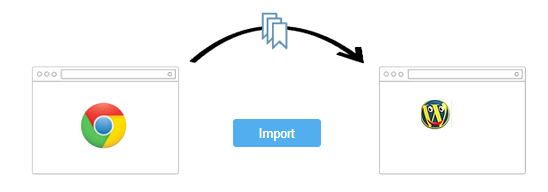
Step-3: Now next step is to add your bookmarks, so click on select bookmarks button at the lower-right corner. After you click on this button, it asks you that do you want to import your bookmarks from google chrome browser ? Now it is upto you, click import if you want or click “Continue/Skip” button if you don’t want.
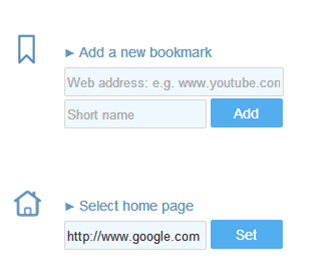
Step-4: Here you can add your own bookmarks to the browser, Gmail, Facebook, Yahoo and Amazon are already added if you want to add your own then you’ve to click on ‘Add A New Bookmark’ so you’ll be given two boxes first is to add the link and second is name. Also click on ‘Select Homepage’ if you want to select a homepage of your own choice. After setting that click on add features.
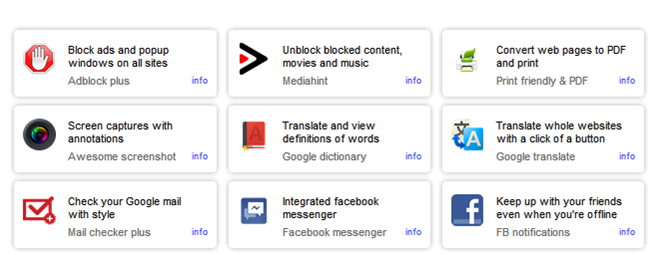
Step-5: Now here are some features you can add to your new browser you’re going to make i.e popup blocking, Unblock blocked sites, Translator, screen captures with annotations, etc. So select one by one in the list which you want to add to your newly browser and then click on Select Theme button.
Step-6: Now you’ll be given 8 themes from which you can select a theme you want. As you select a theme, your browser is ready to download, now click on finish and download button so an automatic download starts and you can see the new browser you created in your downloads folder. Now you can install this on your computer and enjoy your own customized browser.
Read: How To Make Free Online Phone Calls
So friends, above we shared a web-based application which can be used in order to make your own web-browser for your computer, I hope you liked this post.
About the Author:
Basheer Ahmad loves to surf online share useful tools regarding internet/tech etc, through his blog. He recommends to Convert/Download Youtube Videos Using Free Online Tools without any software.
|
1/20/2014 | Continue Reading...
A mobile phone may not be the perfect device to help a student learn a language, but it does have its benefits and those benefits may be enjoyed by students if they know where to look for the apps. The apps listed below are all very useful Windows apps that will help a student to learn a new language. Many of them are good because they are also very useful for learning other subjects too. The list is in no particular order, as it seemed unfair to rank them.
1 - Tutorle
You can learn a new language by using dictionaries. The difference is that you can do it with voice pronunciation functions too, and it has a flash card section. It helps you to figure out and pronounce new words a lot easier.
2 - My Flip Cards
This is a flip card app that works in a very similar way to regular flashcards apps. The best thing about this app that makes it a cut above the rest is that you are given the choice of over three million flashcards to flip through. This means that you will not have to write your own flashcards to flip between because they are already done for you and waiting for you to start flipping when you are ready.
3 - Power Planner
This is a nice little app for remembering to do your homework. It is a planning app that allows you to create a wide number of plans for different situations. This means that you may even plan how you study your language and plan out your next month’s lessons that you have to attend. It can remind you of when thing such as homework are going to be due and allows you to plan for any sort of language based up-and-coming problems.
4 - Langeroo Toolbox Apps
This is a toolbox of quizzes and flashcards that a student of languages may use in order to get more done when it comes to a language. It is a good tool for revision, which may appeal to some students, and it has flashcards for learning languages. There are over one hundred flashcards that have an image that goes with each word to help the student associate the foreign word with the picture.
5 - Bing Translator
This is the Bing version of the Google translator and is useful for finding words that you are unsure about. It is not going to do your homework for you, but it is going to make your coursework a little more sophisticated. This is especially true if the app is used to try and figure out new words that may be used within coursework text. You may make it appear as if you have a far larger vocabulary than you actually do.
6 - FlashStudy English
Sadly, this app is nothing to do with the movie flash dance, and is more a flashcard app for people learning English. You may set the app so that the cards come up in a certain order. This means that you may make it a little more difficult as the flashcard app goes on. Or, you could put them in a random order and learn English that way. It is very good for people who are trying to learn past, present and future tenses in English.
7 - Spanish Past Tense
It teaches you about the Spanish language, but it concentrates on sentence structure. It is good for any level of Spanish learning that you happen to be on, and it helps you to focus on past tense in a way that vastly improves your written Spanish. There are 240 Spanish verbs in the app that help you to sort through and figure out your sentences a little easier. You can pick up the language a lot quicker and a lot more efficiently.
8 - Flashcards+
This is a nice flashcards app that you can use on a language course. It has a very nice built-in flashcard editor so that you can create your own flashcards very easily. You can keep creating flashcards as you go so that it helps you to learn in the long run and build up your knowledge more thoroughly.
9 – Skydrive
With a list such as this, it is hard to miss adding at least one cloud service. This cloud service will allow you to save a mass of your homework on the cloud, and will make it easier for you to share your project work with other students and get your collaborative works done a little faster and more efficiently. You can save notes, dates and important details too. Plus, you can use it to save your essays or your essay structures, notes and plans.
10 - Todoist Lite
Take down notes on each different niche of you language. Add a folder for things that happen in the kitchen, bedroom, office, etc. Or, you can go the route of learning new phrases and writing them down so that you can practice them through the day. Three new full phrases per week in your to-do list and you will soon have the language mastered.
About the Author:Korah Morrison, UCLA student and working as freelance writer at uk.college-paper.org.
|
1/19/2014 | Continue Reading...
An online marketing medium, that is blogging for just anybody who own a business these days. As everyone has noticed, companies seem to resort to social media marketing sites in the the recent past to advertise their business and to make more profit. The most famous social media sites that business owners make use of are Linkedin, Instagram, Twitter and the mighty Facebook.. The blogging aspect is somewhat being overlooked for that reason. But running blogs can be more useful to businesses in many ways that social networking sites cannot do. Listed below are the the advantages of blog advertising from Social network advertising.
1. Blogs can boost Search Engine Optimization (SEO) -
Blogs provide a lot more the type of content that consumers search for and they allow benefits with regards to good search engine rankings. A blog is primarily text-based where useful images can be inserted to draw in readers' attention. It can get indexed by internet search engine bots quicker because of daily or weekly posts of website admins. Bloggers are considered to be as natural link-builders as a result of updates they do on their blogsites.
2. Blogging adds a very personal touch -
An individual or group of people are the ones who are running and managin a blog site. They directly communicate with faithful readers and prospective clients in an excellent way. This is exactly what the personal touch a blogging can make on people. You offer something which is significant and personal for you as well. Your experience is being known to millions of individuals who you do not personally know but yet you reveal to them a bit of your life. Personal stories together with business topics are the most effective since you also provide a glimpse of your personal life to your audience. Through blogging, you may earnth respect of your readers and you may eventually turn into a well-liked blogger.
3. Blogging can help to build a brand -
In blogging, you can actually create a strong loyalty from the customers because you interact with them and added personal touch as well. Emotional blog posts are also striking because it appeals to the values and emotions of the readers. When writing, you can actually deliver your message directly, clearly and quickly and thus providing a focused message to the target audience. Your blog posts must always stand out from the rest. Provide a unique angle on each and every blog post.
4. Blogs can generate attraction from media -
Even respected and famous media organizations such as BBC and CNN dig into blog posts. Blogs on particular niches such as business is actually readily available on the net, with just a single click and you could read a great deal of relevant searches. Keep in mind that internet can also be a great source of information these days. Even mass media people make use of search engines, so it doesn't take a long time for an informative and helpful blog to be noticed. Media is potent too so it is best that you improve your blog to get vistors that could be your potential consumers.
5. Blog features more lucrative niches -
When promoting a business, you have to make use of the niche which is suitable for the services or products that you endorse. By doing this, visitors will reckon that you take care of their needs as and are providing assistance to them. Blogging also can minimize the advertising and marketing costs since it is almost free of charge and may reach a broader and bigger audience. Business should also provide a blog that attaches to the potential customers and communicate with them in the best way possible Social networking sites aren't the only medium that you can utilize to reach an audience. Blogs are crucial as you build your brand and make it influenital on your selected field. As you have seen, blogs can certainly help enhance your business. All that you should do is manage it well and update it regularly with helpful information that internet enthusiasts need.
About the Author:
The AUTHOR is a webmaster of a succesful company that sells gadgets and electronic devices online. He loves to impart his knowledge in advertising through blogging. He is also a contributing writer to www.essayjedi.com.
|
1/14/2014 | Continue Reading...


 I’ve put together a list of 5 basic and useful tips to check out how to utilize your iPhone 5S device.
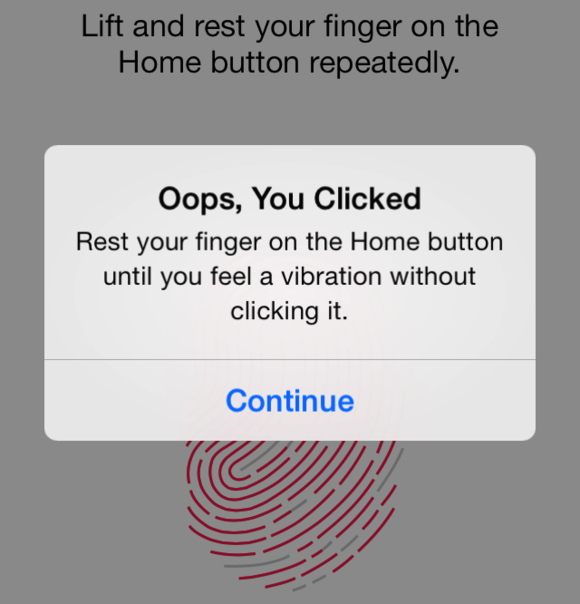 We all do check our phones dozens of times in a day. But, every time opening the passcode could slow you down. But it is important so as to avoid some other person from accessing your device. Thankfully, iPhone 5S has introduced a new feature –Touch ID (a fingerprint identity sensor) that lets you check your iPhone without wasting much of your time.