Showing posts with label tricks. Show all posts

How to Create Customized Browser for Your Computer

Yes, you heard it right! You can also create your own custom web-browser for your computer and browse within it. There may be a question rise in your mind that how we can make a browser without knowing any coding, but don’t worry because there is a free online tool which let you make your own browser with some customized features without any coding to do. If you want to make yours and want to know how then you’ve to read this post because here we’re going to teach you briefly how to make your own browser for PC.

Customizations you can apply:

In the browser you are going to make, you can apply the following customizations, i.e

1. Your own logo

2. Custom Name

3. Custom bookmarks and homepage

4. Custom features – given below etc.

How to Make Your Own Browser Online:

Now here we’re going to teach you how you can make your own web-browser for your computer, having your own logo icon, bookmarks etc. Actually we’ll be make use of MakeMyBrowser which let you do it. The process of making a browser with this is very easy and straight forward, all you need to do is to follow the below instructions and do the steps carefully.

Step-1: First of all you need to do is go to MakeMyBrowser’s WEBSITE [www.makemybrowser.com] and then click on “Start Now” button.

Step-2: In the new page, you will need to give a name to your browser and set your own (or pre-made) icon to the new browser, So enter the name in the first box, and click on ‘Select or upload’ button, a new box appear where you have to select an icon or click on upload button if you want to upload your own.

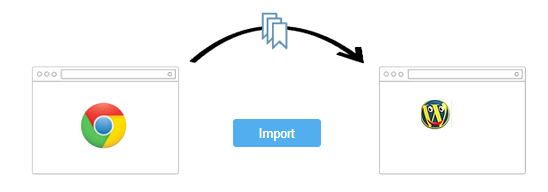
Step-3: Now next step is to add your bookmarks, so click on select bookmarks button at the lower-right corner. After you click on this button, it asks you that do you want to import your bookmarks from google chrome browser ? Now it is upto you, click import if you want or click “Continue/Skip” button if you don’t want.
Create Customized Browser
Step-4: Here you can add your own bookmarks to the browser, Gmail, Facebook, Yahoo and Amazon are already added if you want to add your own then you’ve to click on ‘Add A New Bookmark’ so you’ll be given two boxes first is to add the link and second is name. Also click on ‘Select Homepage’ if you want to select a homepage of your own choice. After setting that click on add features.

Create Customized Browser
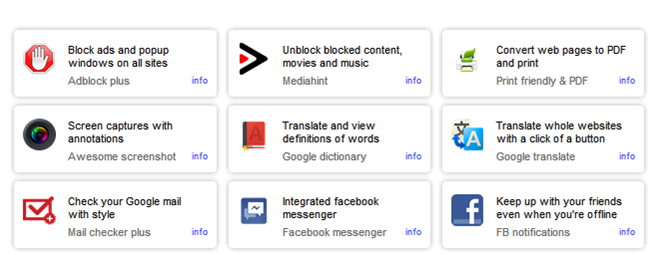
Step-5: Now here are some features you can add to your new browser you’re going to make i.e popup blocking, Unblock blocked sites, Translator, screen captures with annotations, etc. So select one by one in the list which you want to add to your newly browser and then click on Select Theme button.
Create Customized Browser
Step-6: Now you’ll be given 8 themes from which you can select a theme you want. As you select a theme, your browser is ready to download, now click on finish and download button so an automatic download starts and you can see the new browser you created in your downloads folder. Now you can install this on your computer and enjoy your own customized browser.

Read: How To Make Free Online Phone Calls
So friends, above we shared a web-based application which can be used in order to make your own web-browser for your computer, I hope you liked this post.

About the Author:
Basheer Ahmad loves to surf online share useful tools regarding internet/tech etc, through his blog. He recommends to Convert/Download Youtube Videos Using Free Online Tools without any software.
Posted by Ravi Kolhe | 1/20/2014 | Continue Reading...

Top Blogs and Tricks: How to Become A Giant

Becoming a giant in the blogging world is easy, but staying there is like trying to freeze water in an oven. You are not only up against an unforgiving set of search engines that will drop your rank for accidentally linking from a grey-SEO site; you are also up against a world full of bloggers who are trying to beat you. The only people who have ever had a top blog and kept it for more than a week are the ones who work on it ceaselessly. They are the ones who are coming up with material that should (by all accounts) be published instead of blogged.

Keep up the good work

As it suggests in the introduction, the biggest trick is keeping up the effort. Most blogs peter out after around six months when the blogger has run out of ideas, and very few last past two years. The ones that do are often simply maintained and are not actively promoted or have effort put into them.

Forget about the money

This is the biggest trick, and it is a trick because so many people are not willing to do it. Most of the blogs that go past the six month mark will have affiliate advertising placed onto them. After that point, the blogger starts to maintain the blog in order to gain traffic. They are not actively working on their blog to make it a big success; they are doing it for the few dollars that they can make from affiliate money. This is the reason why these bloggers never make it big.

If you do not want to fall into this trap, then do what no other bloggers are doing, and do not add affiliate advertising to your blog. Do nothing on your blog for the sake of making money. Your every action with regards to your blog needs to be to make it successful, popular and loyally attended. This is something that few people are willing to do because there is no financial gain involved, and that is why so few people ever keep their top blog.

Come up with your ideas in advance

There are a few elements to blogging, and one of them is ideas. A lack of ideas is a hindrance but is not a problem. However, if you want a successful and top blog then you cannot simply stop at ideas; you need inspired ideas. You need ideas that other people have not even thought of yet.

You have seen it a hundred times where you type in one blog topic and the search engine gives you a list of results on the topic. That is because the blog topics are fuelled by uninspired ideas. They are manufactured from the ideas of others, which is why there is so much repetition. In essence, you need to go out of your way to be the first link in the chain. You need to be the first one to come up with these ideas to the point where people are copying your ideas instead of you copying theirs.

So why come up with your ideas in advance?

Well, the answer to that should be obvious: inspired ideas take inspiration. Furthermore, good and inspired ideas take time to come to you and to mature into something that you can actually blog about. You also have the challenge of relating your blog topic to the target audience of your choice. Writing an inspired blog post about “end game” post nuclear survival is all well and good, but it is not going to go down very well on your research blog about the body language of kitties.

Make a plan for the next six months

If you make a plan for the next six months then you can be sure that you are not going to run out of ideas over the next few months. You are planning ahead for your own success, and that is the only way that you are going to be able to keep up the momentum to make your blog a top class blog. You also need to make a six month plan for your blog marketing, as this is just as important if you want to make it big.

About the Author: Korah Morrison, working for CrazyEssayWriter.com as a freelance essay writer.
Posted by Ravi Kolhe | 8/15/2013 | Continue Reading...

Clever Tricks to Extend the Battery Life of Your iPhone 4S Device

If you are a fan of Apple and their entirely new generation of smartphones, then you probably remember the so-called “Antenna Gate” scandal short after the iPhone 4. Soon after the release of the device it turned out that some phone mysteriously lose their contact with the network when their owners holds them in their hands.

And then, the history was about to repeat itself with the new iPhone 4S when it turned out that the battery of the phone was running out just in a couple of hours. As a matter of fact, this problem is not only a problem of the iPhone 4S owners, but also of all users, who have upgraded the platform of their device from iOS 4 to iOS 5.

extend_battery_Life_iPhone_4S
A few months later, iDowload Blog managed to clarify the reason for this abnormally rapid discharge of the battery of iPhone 4S.

According to them, the problem is connected not to the hardware of the device, but with the iOS5 operating system. So, the problem is that instead of periodically determining the location of the iPhone 4S when necessary, the change of the time zone becomes constant.

In order to solve the problem, users should turn off the automatic time zone change function. The only disadvantage is that when going to a different time zone in the future, the owner of iPhone 4S will have to set their smarphone's clock manually.

If you are also one of the owners of iPhone 4S, don't worry. There are some simple steps that will help you extend your battery life. Here are ten tips how to do that:

1. The first thing you need to do is disable the automatic time zone change function. As we already mentioned, this function is responsible for setting your iPhone's clock when you pass from one time zone to another. The problem is that the function requires the phone to determine your location all the time, which ultimately leads to rapid discharge of the battery.

In order to turn off the Time Zone function, go to Settings>Location Services>System services.

2. Turning on your iPhone's Wi-Fi connection function is also responsible for discharging your battery faster than usual. A good idea is to turn the function off whenever you don't use it. Go to your iPhone 4S' settings in order to do that.

3. Another trick you can use in order to extend the battery life of your iPhone is to turn all locational services off, because they use a great part of your smartphone's battery. Some of these locational services are: Find My Friends, Find My iPhone, Siri, etc.

4. Turn off the vibration. Leaving it turned on might be a problem in case you use all options of your iPhone 4S, because the vibration can turn out to be one of the main consumers of power. Go to Settings>Sounds in order to turn it off.

5. The option that is responsible for the automatic correction of your iPhone's display brightness is a great one. This means that every time that you find yourself in a dark place, the display brightness will be increased automatically. However, this affects your battery life, so make sure you keep medium brightness values.

6. The so-called “Push” notifications are another major consumer of power. Turn them off in order to extend your battery life.

7. Another trick that you may find useful is to turn your iCloud application off. This, however, means that you won't be able to use the features that iCloud provides you with. So, judge for yourself. You can turn the service off by going yo Settings>iCloud>Documents & Data>Cellular – off.

8. As an iPhone 4S owner you are probably aware of the fact that your smartphone has a permanent iTunes Wi-Fi synchronization, so you better turn this option off when you don't need it.

9. iPhone 4S constantly sends some data necessary for the maintenance and diagnosis of your smartphone. So, if you turn this option, you will surely extend your battery life.

10. And still, if none of the above tricks and tips is good enough for you to extend the life of your smartphone's battery, then there is only one way left for you to deal with the problem – try to restore all the original settings of iPhone 4S and don't forget to make a backup of your system in case something goes wrong.

About the Author:
Rose Finchley is a passionate writer. Her favourite topics are technologies and gadgets. She is working for http://www.endoftenancycleaners.net/paddington-w2/ and in her free time she likes to read about the latest technology news.
Posted by Ravi Kolhe | 8/06/2013 | Continue Reading...

How To Speed Up Your Android Smartphone

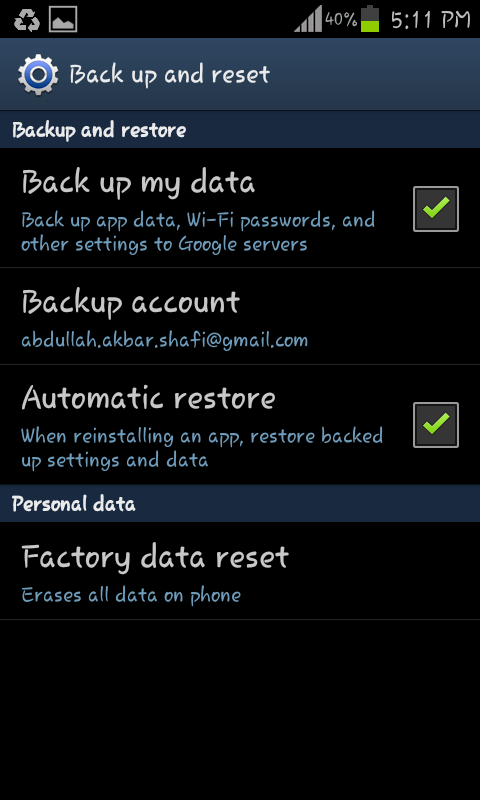
Android smartphones are quite common nowadays Well they get slow with time and you need to give it some and to make it better otherwise it starts lacking In Almost every app.. There are some built-in functions that can help speed up your smartphone.

Let us see some steps to Speed it up …

Update it Frequently: Updating fixes bugs and upgrades many firmware and it helps to Improve the decision making time and function execution time.


Speed Up Your Android-Update it Frequently

Hard Reset: Resetting bring backs the phone to its brand new condition everything get new and it moves like a new phone. (don’t forget to back up your important data before reset as it removes everything from your phone).

Speed Up Your Android-Hard Reset

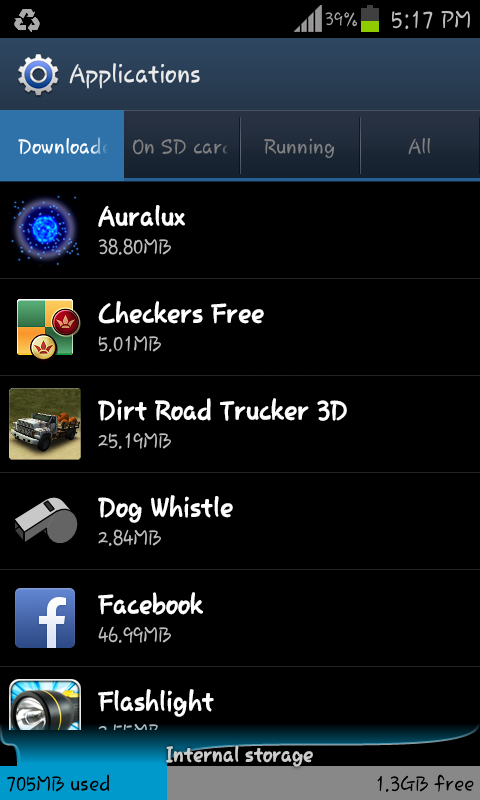
Move Data from internal memory to external: Internal memory is used for all the operations to carry on soo the more space available the more phone will be efficient. Soo move your data from Internal memory to SD card or some external Memory.

Uninstall Rarely used Applications: The applications you no longer use you should Uninstall them.

Speed Up Your Android-Uninstall Rarely used Applications

Restarting your Smartphone: It Ends all the processes that were being using RAM.


Speed Up Your Android-Restarting your Smartphone

Task manage:r In task manager there is a option to kill active application and free Ram by killing The Running option.. use it frequently it also helps to save the battery.

Speed Up Your Android-task manager

About the Author: This post is written by Abdullah Akbar.. Writer At Techbeasts.com
Posted by Ravi Kolhe | 6/24/2013 | Continue Reading...

9 Tips and Tricks for Kindle Paperwhite

Amazon released Kindle Paperwhite last winter and it soon made a big splash in the eReader pool. The better tech specs together with Amazon's complete eco-system make the device stand out among its rivals. Here are 10 tricks and tips for Kindle Paperwhite, which are bound to let people use the device more flexibly.

1. Change the name of your Kindle Paperwhite

The device name will display as someone's Kindle or someone's which Kindle in the top left corner on the home screen by default. To change the name of your Kindle Paperwhite, you can tap options icon in the top right corner, select "Settings" -> "Device Options" -> "Personalize your Kindle" -> "Device Name" and change the name.


Change the name of your Kindle Paperwhite

2. Customize the Send-to-Kindle email address.

Amazon enables users to send personal docs to Kindle devices as well as Kindle apps by launching Send-to-Kindle service. However, the Send-to-Kindle email address is neither easy to read nor easy to remember. You can customize the Send-to-Kindle email address on the Amazon site.


Go to "Your Account" -> "Manage Your Kindle" -> "Personal Document Settings" (under "Your Kindle Account"). Click "Edit" on the right side of the Send-to-Kindle email address you want to customize, input the new identification string and click "Update" button. Then the Send-to-Kindle email address of your Kindle Paperwhite will be changed.

3. Transfer your personal docs to Kindle Paperwhite wirelessly

Normally, people transfer personal eBooks or docs to Kindle with the USB cable. If you want to transfer files to Kindle device wirelessly, try to use Amazon Send-to-Kindle service.


Transfer your personal docs to Kindle Paperwhite wirelessly

If you have customized the Send-to-Kindle email address in Trick 2, you are bound to remember your Kindle Paperwhite email address. Otherwise, you can check the Send-to-Kindle email address by tapping options icon -> "Settings" -> "Device Options" -> "Personalize your Kindle" on the device. Follow this guide to transfer books to your Kindle wirelessly.

4. Remove recommended items

There are four recommended items at the bottom of the home screen by default (under "on Device" shelf). If you want to remove the recommended titles, tap options icon -> "Settings" -> "Device Options" -> "Parental Controls" and turn off "Kindle Store". Tap "OK" and go back to the home screen, you will find the recommended items removed. Note that you will be required to input the password the first time you use this feature.


Remove recommended items

5. Change the screensaver

There is no way to change wallpaper on Kindle Paperwhite, but you are able to customize the screensaver for your Kindle. You will have to hack the device in this case, but it is not that difficult.

Google for "Kindle Paperwhite screensaver hack 5.3.5" (format: Your device name + "screensaver hack" + "Firmware Version Number"). You are able to find a hack solution for your Kindle Paperwhite. As to awesome screensavers for Kindle Paperwhite, you can go to kindlesavers.com, Kindlewallpapers.tumblr.com or google image search.


Change the screensaver


6. Take screenshots

Amazon offers a special way to take screenshots on the Kindle Paperwhite. Synchronously tap the upper left corner and the lower right corner (or the upper right corner and the lower left corner) on the screen. Once you plug the Kindle Paperwhite to the computer, you will find the screenshot pics under the Kindle storage.


Take screenshots

7. Play games on Kindle Paperwhite

Besides pure reading, people are able to install apps and play black-and-white games on Kindle Paperwhite, which are known as "active content".

Go to Amazon site, search for "active content", select an item you are interested in, select "Deliver to" your Kindle Paperwhite and click "Buy now with 1-Click". Check your device and you will find the game on the home screen titled with "Active" (Internet connection required). After downloading, tap the icon to start gaming.

Play games on Kindle Paperwhite

Note that active content only applies to E-ink Kindle readers.

8. Manage notes and highlights of your eBooks

You might want to check the notes and highlights after finishing a book on the Kindle Paperwhite. Plug your Kindle to computer, go to "documents" and open "My Clippings.txt". You are also able to edit the content or share the book notes and highlights with your friends.

Manage notes and highlights of your eBooks

9. Specify dictionaries

Your books on Kindle Paperwhite may come in more than one language. In this case, you can specify the default dictionary by tapping options icon -> ”Settings” -> “Device Options” -> “Language and Dictionaries” -> “Dictionaries”. If there is no dictionary on the device, you can go to Amazon cloud or purchase / download free dictionaries from Amazon store.


Specify dictionaries

About the Author:
Ada Wang is fond of reading, singing and painting. She works for Epubor, also writes tech-related guides, tips, reviews, etc. for a collection of blogs.
Posted by Ravi Kolhe | 6/19/2013 | Continue Reading...

How can you guard your gadgets from all the elements during summer?

What do you generally do to take care of your precious electronic devices? May be use them sensibly and repair on time. That’s perhaps not sufficient to keep your gadgets in well condition for long. You need to protect your electronic items from the natural elements like water and dust too. This is important for your devices to function properly.

How you can protect your electronics from various elements this summer?

However, during summers, it becomes more important to safeguard your gadgets as humidity also adds up to the dust and heat. Here is how you must work on preventing your expensive gadgets from the assaults of summer:

1. Get waterproof cases: Water is perhaps the most dangerous enemy to your electronic gadgets. Even a little bit of moisture can cause severe damage to your smartphones or laptops. That’s why it’s extremely important for you to protect your gadget against water. Get suitable waterproof cases for your gadgets. Various companies are there who manufacture effective waterproof cases for most of the gadgets including iPad and smartphones. Some covers can even make your gadget float if you mistakenly drop it into water. You can even get these waterproof covers from online shopping portals. You must search properly to get a cover according to the size of your device.

2. Sport ear buds are helpful: Not only your gadgets, but the accessories also need to be protected. Start with protecting your earplugs. There are various waterproof ear buds that come with smart over-the-ear clip designs. This keeps your earplugs in place along with safeguarding them from water and dust. These ear buds are extremely suitable for the summer season as you can even go swimming with the buds on. You can select the right size to suit you best.


How can you guard your gadgets from all the elements during summer?
3. Keep EVAP bags with you always: There are possibilities for you to drop your gadgets accidentally into water. Even in rain it may turn difficult for you to safeguard your gadgets properly. So, what can be the solution? EVAP bags can save you from the trouble. The EVAP bag is an effective solution for drying out wet phones, digital cameras, iPods, and storage devices. All you need to do is to turn off your smartphone or electronic gadget, remove the battery and dry out the visible water drops. Then put the device in the EVAP bag to make all the moisture gone. It may take nearly 2 days to dry out the wet device completely. This is indeed an important protection for your electronic devices in summer.

4. Opt for padded carrying cases: Apart from dust, water and humidity, you must protect your gadgets against shocks too. A sudden jerk or thrash may harm the hardware of delicate gadgets. A padded cover may help to reduce the impact of shock to some extent. They aren’t much expensive but very much essential.

The measures mentioned above can help you to save your gadget from all the elements this summer. So just get the coverage of these protective measures and safeguard your gadgets.
Posted by Ravi Kolhe | 5/24/2013 | Continue Reading...

4 Ways to Get Yourself in the Mood for Writing

Blogging can be demanding especially during times when you feel you’re running out of creative juices.
You want to deliver only quality content so there’s no way you will rush your next writing output for the sake of increasing post quantity.
You know so much time is wasted if you will only sit there, doing nothing. There are ways how you can set yourself in the mood for writing.

List down topics
It’s okay if you are not yet ready to write an article. Do not push too hard on yourself.
Use your time instead to checking out other blog posts. And do not feel pressured to immediately spot a topic you can write yourself.
The more posts you read, the better. The more ideas you generate, the more writing inspirations that you gather, the more options you make in deciding what to talk about next. Do not worry as well about grammar. That does not matter yet.
The list you create is all yours for viewing after all.

Write drafts
Once you have chosen a topic then you can begin writing your piece.
Again, this does not have to be error-free. You can go back again and edit your work. The rule of thumb is to start with an outline which serves as your direction where you are steering your content to.
Following outlines help ensure that your statements are consistent to your topic. It helps you as well limit characters, if that is another concern you are looking into.
Since this is yet your final output, you can write as you think. The most important thing is that you get to note down ideas that cross your mind. It might take some time before they come visit again.


4 Ways to Get Yourself in the Mood for Writing-essay writer
Look for your productive time.
Do you tend to do more in the morning? Or do you write faster at night when everyone else has already gone to bed?
We all have this particular time when we feel at our most productive. Identify yours and make advantage of it. Prioritize tasks that demand more brain work so all that is left for you to take care as the day progresses are the easier ones.
Do not put too much pressure on yourself. Even the greatest writers write crap too. But they manage to come up with an excellent work because they are at the same time great editors.

Spot your happy place
Aside from that particular time during the day when our brain is functioning effectively, there is as well that specific place that our creative juices favor.
Some are comfortable writing essays in crowded places such as coffee shops or theme parks, while some prefer staying in a quiet place. Libraries for instance.
It is essential that you are aware of your happy place so you can further encourage your mind to work. It also helps that you keep a notepad (your smartphone will do) so you can immediately jot down ideas that suddenly pop into your mind.

About the Author:
Nettie Gray always keeps a pen and paper handy. She’s bad at keeping writing essays ideas safely tucked in her memory.
Posted by Ravi Kolhe | 5/17/2013 | Continue Reading...

5 PC Maintenance Tips

In this day and age, we depend on our computers. They keep us connected to the outside world and help us take care of important tasks, like paying the bills. You need to make sure you take proper care of your computer. Here are a couple of ways you can make sure you get your money's worth out of your computer before you have to cash in for a new one.

1. Update Your Computer's Software
Your computer's operating system is a living, breathing organism. It is constantly being updated. Companies like Microsoft release updates for their operating system almost weekly. You need to make sure you stay on top of these updates. Just have your computer automatically download and install these updates for you so you can enjoy new features, bug fixes, and added protection for your operating system.

2. Physically Clean Your Computer
Computers can accumulate masses of dust and debris over a short period of time. It's always a good idea to do your best to clean it out. Just grab a can of compressed air from the store and aim it into your computer's cooling fans. This will help loosen the dust to prevent overheating, which can greatly slow down your computer. While you're at it, make sure you take some of that compressed air to your keyboards to make sure you don't have any food crumbs stuck in the gaps.

3. Defragment Your Hard Drive
Your computer's operating system should have a defragmenter tool. The purpose of this tool is to help consolidate data on your hard drive to help your computer run faster. This process can take several hours, depending on the size of your hard drive and the amount of data you have stored. It may also take longer if it is your first time running the program, so make sure you run it when you plan on not using your computer, like at night while you sleep.

4. Protect your computer with an Anti-Virus program
Viruses, spyware, malware, and other malicious files can cause much harm and ruin your computer. You should have an active anti-virus program and run it at least once a week. These types of programs can prevent your computer from being infected and even remove any existing infections.

5. Backup Your Information
Always be prepared for the worst. Your computer's files are very precious and important. Having your computer crash and not being able to recover your files can be very problematic. It's a good idea to invest in an external hard drive so you can remotely backup your files. You can also use an online website that can backup your information.

About the author: Michael is a blogger for Smith Monitoring, the leading provider of home security systems. He is obsessed with taking care of his computer and loves spreading the knowledge. He wants to make sure everyone gets their money's worth out of their technology.
Posted by Ravi Kolhe | 4/20/2013 | Continue Reading...

Computer Cleanup Software for Optimize Performance

CCleaner
Do you know? there are many different files and programs saved on your computer you never actually use. There is no need to leave these files to clutter up your hard drive when you can be using that space for data you access on a regular basis. If there are large numbers of unused files you need to remove all at once, you can use the disk cleanup utility CCleaner.

It removes unused files from your system - allowing Windows to run faster and freeing up valuable hard disk space. Ccleaner is supported with Windows 2000 / XP / Vista / Windows7 / XP64 / Vista64 / Windows7 64 / Windows8 / Windows8 64. You can download CCleaner from FileHippo.com.
Download CCleaner (Aprx.Size: 4.00MB)

Computer Cleanup Software for Optimize Performance CCleaner
  • Cleans Windows - Recycle Bin, Recent Documents, Temporary files and Log files.
  • Cleans Browsers- IE, Firefox, Chrome, Opera, Safari.
  • Cleans traces of your online activities such as your browsing history.
  • It also safely cleans Registry and also installed application.

Defraggler
Disk defragmenting is best way to improve PC Performance. Defragmentation is the process of putting file pieces back together. Disk defragmenters do is re-write files into contiguous blocks of free space making sure that all file fragments are written in a consecutive order. Hard drives which have been used for a year or more could certainly benefit from defragmenting. Defraggler lets you specify one or more files, folders, or the whole drive to defragment. You can use Defraggler program on Windows XP, Vista, Windows 7 and Windows 8.  
Download Defragger (Aprx.Size: 3.64MB)

Computer Cleanup Software for Optimize Performance Defraggler

  • Defraggler is just as safe for your files as using Windows.
  • Organizes empty disk space to further prevent fragmentation.
  • Boot time defrag of system files.
  • Supported to window Operating Systems.

Related Post(s):
5 Simple Ways to Recover Lost Password
How To Improve PC Performance
Posted by Ravi Kolhe | 3/12/2013 | Continue Reading...

Tips for How to Copy to A Flash Drive

How to Copy to A Flash drive is guide for beginners who want to learn about Flash Drives.  Flash drives are just a USB hard drive that is very portable. They are very handy but if you are moving large amounts of data CD or DVD is much cheaper up front if you already have a burner. But a flash drive can be used over and over. For the simple thought it is a small hard drive that you put in the USB port. If you have heard of a pen drive they are the same thing.

These USB flash drives are integrated with a USB interface. They are small, removable and rewritable. Their main advantages over other storage devices are  that they are faster, more compact, can hold more data and are much more reliable thanks to their durable designs and lack of moving parts. You can also get these in various capacities ranging from 32MB to may be 8GB also. As in comparison to the floppy drives that are capable of storing just 1.4MB of data, the USB drives are capable of offering a huge storage capacity.

How to Copy to A Flash Drive
How to Copy to A Flash Drive-
1) Insert the USB flash drive into the USB port.
2) Your computer should automatically detect it and open up a window that has its contents. If not automatically detect you can Open "My Computer"(in Win XP) and double-click the removable disk icon. This is the USB flash drive.
3) Find the file that you need to move onto it and just drag and drop it into the Pen Drives window or right-click the file, select "Send to" and choose the USB flash drive from the list of available drives.
4) Its as simple as that. Then close the window and disconnect the drive. For disconnect drive look for the Remove Hardware icon in the bottom-right corner of the bar at the bottom of your screen and choose the "Safely remove mass storage device" link beside it.
Remember: Flash drives or pen drives are one of the most simple and efficient way of data transfer, but increases the risk factor so as happened to these drives also. With being very flexible it has become a very simple ride for viruses to spread. As it is very easy for the Viruses or Trojans to copy their traces to these removable drives.
Posted by Ravi Kolhe | 3/08/2013 | Continue Reading...