


Before start discussion on format a computer without cd, we know formatting is easier
and faster when having severe problems with their computer that could possibly
be caused by a virus, to delete the partition and reformat the hard drive
because it ensures that the virus is gone.
Reformatting the hard drive is like wiping off a chalkboard and starting
over with a clean surface.
If you
have used your PC for a long period of time and it has become slow and bogged
down, reformatting can help make your computer seem brand new again. If a
computer is reformatted in this manner, caution should be taken to reformat all
hard drives attached to the computer since the virus that infected the machine
could have infected files on other hard drives, not just the primary drive.
You can
also use the built-in software on your computer to format a hard drive. There
are a number of tools to help you do these things. Formatting a hard drive
causes all of the data on the drive to be deleted, so don't format a hard drive
unless you've backed up.
2 Tips For Format A Computer Without CD:

1: Format
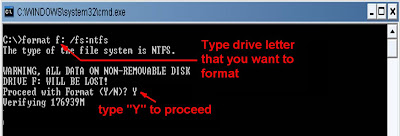
using command prompt
To format
using command prompt click start ->All Program-> Accessories-> command
prompt then
type format <drive
letter:> /fs:ntfs (fs specifies the type of file system) example: format
d: /fs:ntfs
(you can also access command
prompt using run and type 'cmd')

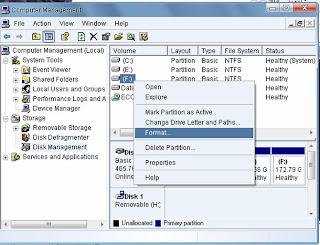
2: Format
using Computer Management
Log in as
an administrator on your PC. Then start -> control panel-> Administrative
Tools-> Computer management then
select Disk Management located in storage section, then just right click on drive that you want to format and
select format option.
Using
this method you can't format primary drive If you want to format primary drive
also you can follow steps in Step by step XP Installation. Both methods are
simplest ways to format hard drive excluding primary drive. I hope this 'format
a computer without cd' short tutorial help you to repair your PC.
