


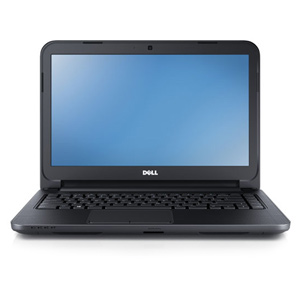
The DELL laptops, well-known for their quality products and sleek design have once again revolutionized the computer world with the introduction of Dell Inspiron 14 3421. A clean, impressive and neat design with backlit keyboard and an excellent battery life describes the new Dell 14z. Let us not forget the best feature: affordable price! It thins down the bulky look without sacrificing performance or battery life. Dell gives a warranty of 1 year for its product quality and compatibility. In this era where the trend is headed towards ‘Thinner is better’ DELL INSPIRON scores a straight 10/10.14.It run on a 2.3 GHz Intel Core i3 processor with 500 GB hard drive and 4 GB RAM. It offers many high-end unique features.
 PERFORMANCE:
The 3rd Generation Intel Core Processor quickens the speed of the system with the support of the Windows 8 which syncs the files and photos to the cloud. The Window 8 works well with different apps and also gets thing done faster and better. Upgraded to the new 2GB NVIDIA graphics, it takes motion pictures to the next level and almost makes them real. Credit has to be given to their improved PC gaming and detailed vision with the new 2GB AMD Radeon.
TOUCH:
The optional touch functionality provides the use of the fingers to perform the operations be it writing, swiping and editing. The introduction of touch has given the DELL INSPIRON the feel of a mobile. Scrolling and rotating are easy with simple hand gestures effortless. The Windows 8 with its lightening speed gives quick responses to every touch.
ENTERTAINMENT:
Entertainment has never been more entertaining as it is with the Dell laptops. It has the DVD-RW drive and a 500 GB hard drive all on board for saving files, music, videos, and what not. The integrated DVD-RW is of good speed and the 35.5cm (14) vivid HD display with the 16.9 WLED.
COMPATIBLE:
The Inspiron is compatible with the new 8-in-1 memory card reader, USB 3.0 and HDMI 1.4 ports. The USB 3.0 is 10 times faster than the previously used USB 2.0. The 8 in 1 card reader makes access to media easy and convenient than the traditional cable.
SLEEK:
The Dell Inspiron 14 3421 is astonishingly thin removing all the unnecessary fat but yet offering better and more stylish appearance without sacrificing any of the important features. It has a 4 cell battery which is easy to carry along with a 2.54 cm thin with 4 cell battery.
Power:
The battery backup is for a total of 3.5 hours of power supply. The AC supply is via 65 Watts AC adapter and the warranty is for a period of 1 year. When the AC power has been cutoff, the 4 cell battery takes its place.
Offering these top quality features the Dell has set a new set of standard for the companies to compete. For networking it provides Ethernet 802.11 Wifi , Bluetooth and optional WiMax. The stereo speakers and headphone jack are for audio while the HDMI, Mini Display Port is for video. The extra RAM gives a hand to boost the multitasking. The software comes preloaded with the recent antivirus software and protects the system. The Accidental Damage Service, McAfee® SecurityCenter, LoJack for Laptops®2 and DataSafe Online backup are the power protection services offered. It is easy to carry, where ever we need to go.
Dell has taken the extra effort in manufacturing this serious allowing not a gram of extra or unnecessary part to establish the slim design. But the device is definitely worth the effort put it. A job well done indeed!
About the Author:
Vinnit Alex is an eminent author who provides concrete information about computing devices like computers and laptops, as latest Dell laptops, HP laptops are some of the devices.
The 3rd Generation Intel Core Processor quickens the speed of the system with the support of the Windows 8 which syncs the files and photos to the cloud. The Window 8 works well with different apps and also gets thing done faster and better. Upgraded to the new 2GB NVIDIA graphics, it takes motion pictures to the next level and almost makes them real. Credit has to be given to their improved PC gaming and detailed vision with the new 2GB AMD Radeon.
TOUCH:
The optional touch functionality provides the use of the fingers to perform the operations be it writing, swiping and editing. The introduction of touch has given the DELL INSPIRON the feel of a mobile. Scrolling and rotating are easy with simple hand gestures effortless. The Windows 8 with its lightening speed gives quick responses to every touch.
ENTERTAINMENT:
Entertainment has never been more entertaining as it is with the Dell laptops. It has the DVD-RW drive and a 500 GB hard drive all on board for saving files, music, videos, and what not. The integrated DVD-RW is of good speed and the 35.5cm (14) vivid HD display with the 16.9 WLED.
COMPATIBLE:
The Inspiron is compatible with the new 8-in-1 memory card reader, USB 3.0 and HDMI 1.4 ports. The USB 3.0 is 10 times faster than the previously used USB 2.0. The 8 in 1 card reader makes access to media easy and convenient than the traditional cable.
SLEEK:
The Dell Inspiron 14 3421 is astonishingly thin removing all the unnecessary fat but yet offering better and more stylish appearance without sacrificing any of the important features. It has a 4 cell battery which is easy to carry along with a 2.54 cm thin with 4 cell battery.
Power:
The battery backup is for a total of 3.5 hours of power supply. The AC supply is via 65 Watts AC adapter and the warranty is for a period of 1 year. When the AC power has been cutoff, the 4 cell battery takes its place.
Offering these top quality features the Dell has set a new set of standard for the companies to compete. For networking it provides Ethernet 802.11 Wifi , Bluetooth and optional WiMax. The stereo speakers and headphone jack are for audio while the HDMI, Mini Display Port is for video. The extra RAM gives a hand to boost the multitasking. The software comes preloaded with the recent antivirus software and protects the system. The Accidental Damage Service, McAfee® SecurityCenter, LoJack for Laptops®2 and DataSafe Online backup are the power protection services offered. It is easy to carry, where ever we need to go.
Dell has taken the extra effort in manufacturing this serious allowing not a gram of extra or unnecessary part to establish the slim design. But the device is definitely worth the effort put it. A job well done indeed!
About the Author:
Vinnit Alex is an eminent author who provides concrete information about computing devices like computers and laptops, as latest Dell laptops, HP laptops are some of the devices.

 If your family members utilize the computer generally for internet and word processing, a laptop computer might be a viable option. However, video gaming, video enhancing and even desktop establishing require extra memory, and probably high-end graphics and sound cards. All of these will add to the expense and the mass of the device.